What's New in Mortly: June 2026

Welcome back. Last month I promised this would become a habit, and here we are, right on schedule. This is the second edition of our monthly walk through what we built in Mortly, in plain English, minus the changelog and the engineer-speak.
June was a sharpen-the-blade kind of month. Two things you'll actually see, a whole new look for your fee sheet and Mortly living right on your phone's home screen, plus a handful of quiet precision touches under the hood. Let's dig in.
Fee Sheets, Chapter Two: The Statement
Let's start with the headliner. Last month your fee sheet got a wardrobe. This month it got a whole new outfit.
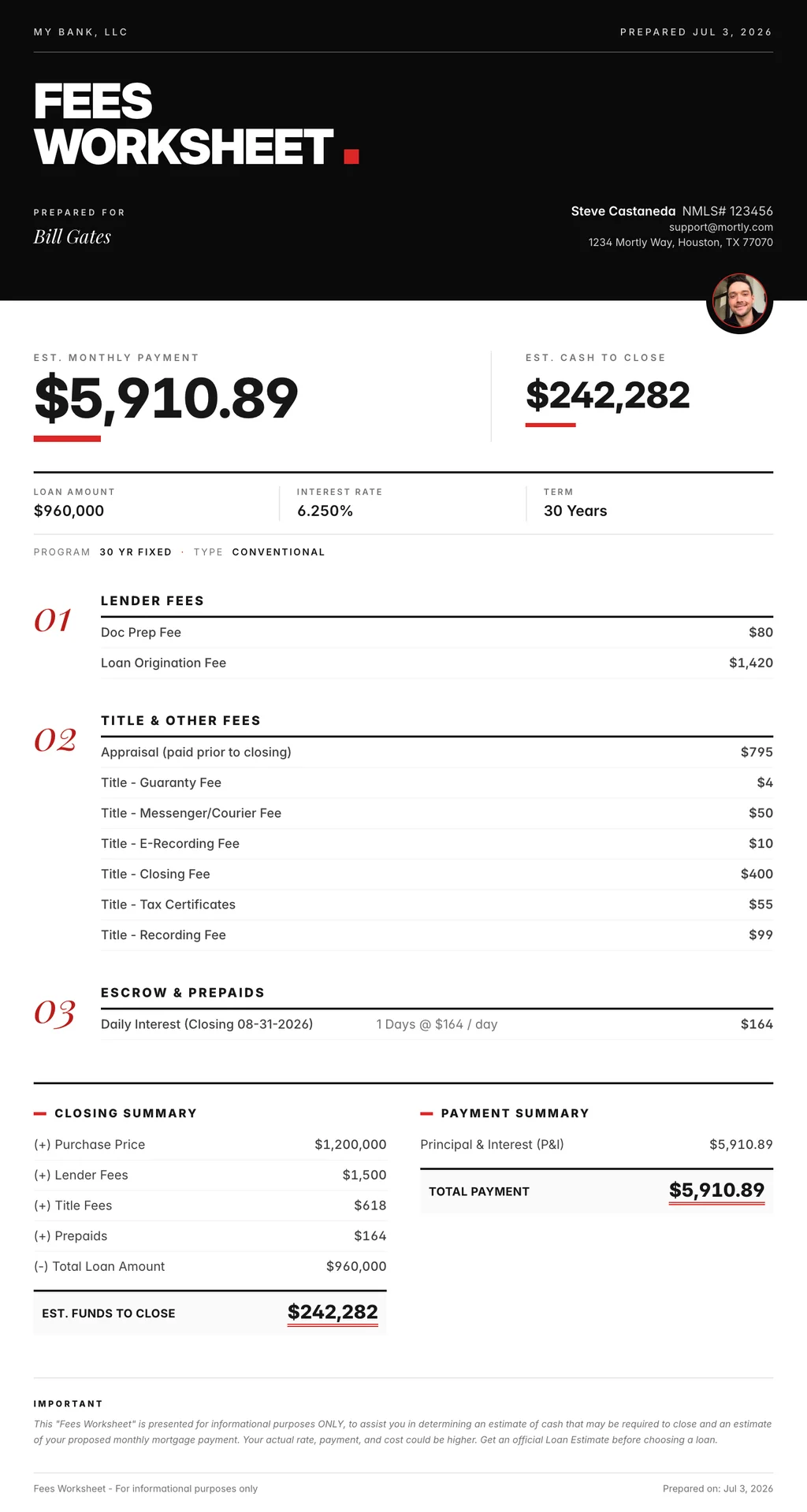
Meet the Statement, a brand-new fee-sheet template built to look like, well, a statement. Crisp serif type, numbered fee sections, the whole thing laid out like a polished document from a private bank instead of a printout from the office copier. Same numbers you've always trusted. A lot more gravitas.
Here's my favorite touch. The Statement carries a small circular seal up top with your headshot inside it, the way a wax seal sits on official letterhead. No photo on your profile yet? It falls back to a tidy monogram of your initials. Either way, the sheet doesn't just say "here are your costs." It says "these came from me, and I stand behind them."
And you can set the tone to match your brand. The Statement ships with three ready-made themes you switch between from the new theme drawer: Black & Red (the default), Slate & Sky, and Navy & Gold. Pick the one that feels like you and go.
Mortly, Right on Your Home Screen
Next up, something you can take with you. Mortly now installs straight onto your iPhone or Android home screen, with its own dark app icon: the blue Mortly mark on slate.

Tap it and Mortly opens full-screen, like a real app. No address bar, no browser tabs, no back button hovering at the bottom, just the app running clean from the top of your screen to the very bottom. It's the difference between a guest badge and your own set of keys.
Adding it takes about ten seconds:
- On an iPhone, open Mortly in Safari and follow Apple's quick guide: Turn a website into an app in Safari on iPhone.
- On Android, open Mortly in Chrome and follow Google's steps: Create shortcuts for websites in Chrome.
Why bother? Because you live on your phone. Between calls, in the school pickup line, the moment a borrower texts a what-if. Now a fresh scenario is one tap from your home screen, no hunting through a stack of browser tabs for the one you swear you left open.
✨ The Little Things That Add Up
A few smaller upgrades you'll feel more than notice:
- Your economic calendar stays put. A hiccup in the daily data refresh used to blank the economic calendar right off your dashboard until the next good pull came in. Now a bad refresh gets quietly ignored and your last good calendar stays on screen, so the Fed meeting you were watching for doesn't disappear on you.
- Snappier lead search. Searching your leads (and the Cmd/Ctrl+K quick-jump box) is quicker now, and the results no longer blink empty while you type. Your previous matches stay on screen until the new ones land, so the list never flashes blank mid-keystroke.
- Team billing shows the real total. If you run a team, your billing total now reflects your actual plan, with your seats and any discount applied correctly, instead of a single per-seat price. The number you see is finally the number you pay.
- Quietly sharper math. We spent time this month double-checking Mortly's numbers against a real loan-origination system and tightening a couple of mortgage-insurance calculations down to the penny. It's the kind of accuracy you should never have to think about. That's exactly the point.
See You Next Month
That's June. A little quieter on the surface than May, sure, but there's bigger stuff in the oven that I can't wait to show you. Some of it has been cooking for a while. You'll see.
And like every month, every single item up there started with a loan officer telling us what was slowing them down. So keep it coming. That feedback is where this whole list comes from, and I read every note.
Talk soon. 👋